
Video Editing Chair: How to Choose the Right One for You
Learn how to choose the right video editing chair with expert comparisons and ergonomic tips for long editing sessions.
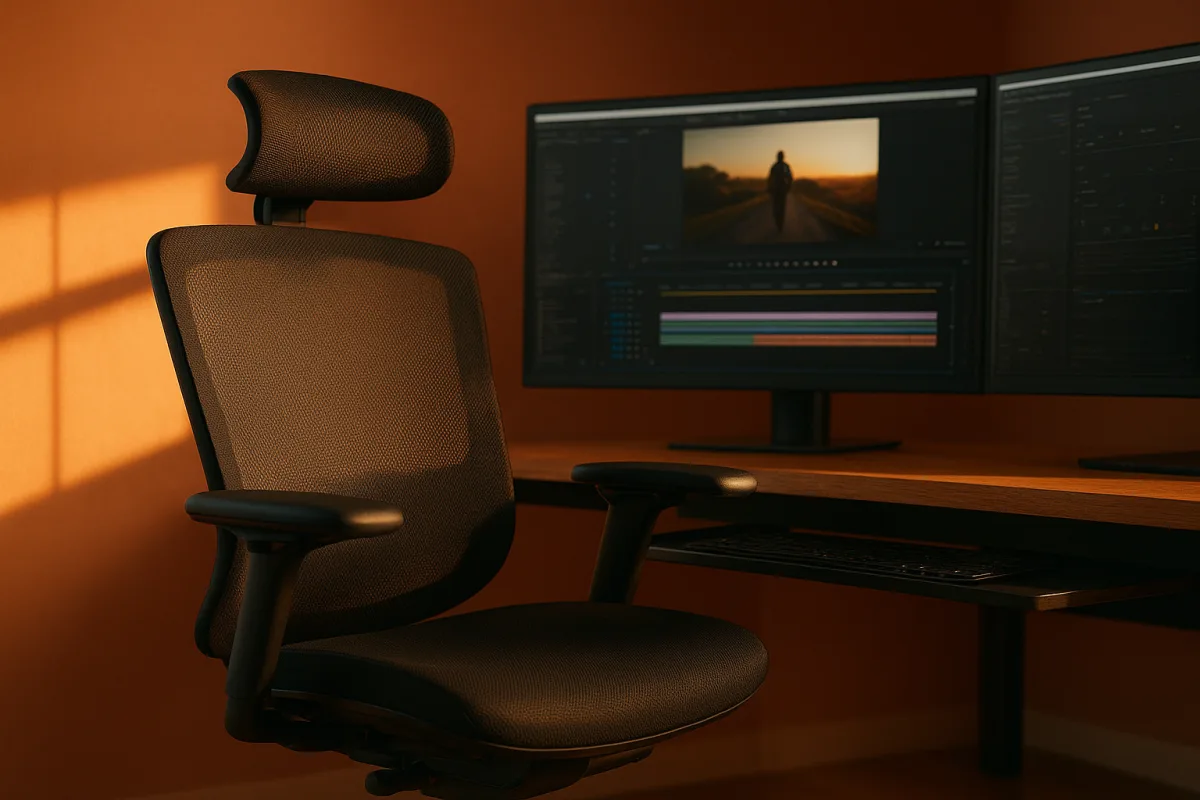
The decision: Herman Miller Aeron or SIHOO Doro C300?
This is a decision between two chairs aimed at long editing days, not a roundup of every chair with a headrest and a marketing page. The Herman Miller Aeron is the premium, long-ownership choice. The SIHOO Doro C300 is the mid-range choice for editors who want auto-adaptive ergonomics.
They are close in purpose, but not in what they ask you to prioritise. Pick the Aeron when proven premium support, warranty coverage, and a chair you expect to keep for years matter more than value. Pick the Doro C300 when fit variability is the problem.
That distinction matters in post-production. A chair can feel fine during a 20-minute rough cut, then expose a bad lumbar position halfway through a conform, when you have stopped moving because the timeline is fighting you.
I have not physically used either chair. This comparison rests on the reported features and the broader ergonomic guidance in the research, not on pretending a few hours in a showroom can predict how your back will feel after delivery week.
Head-to-head comparison
| Criterion | Herman Miller Aeron | SIHOO Doro C300 |
|---|---|---|
| Position in the field | Premium option | Mid-range option |
| Core support approach | Reported to offer exceptional lumbar support, with a design aimed at sustained professional use. [24] | Uses auto-adaptive lumbar support, intended to respond more dynamically to the sitter’s position. [21] |
| Best case for an editor | The editor who spends full days at a desk and values established premium ergonomics and long ownership. | The editor who changes posture often or has found fixed lumbar pads hit the wrong part of their back. |
| Fit risk | Premium support still has to match your body. Incorrect seat depth, height, or lumbar placement can make an expensive chair uncomfortable. [[12]](https://www.urbngear.com/why-your-expensive-ergonomic-chair-still-feels-wrong?utm_source=openai "Why your expensive ergonomic chair still feels wrong | URBNGEAR")[[15]](https://www.consumerreports.org/home-garden/furniture/smarter-youre-not-sitting-in-your-chair-right-a4469970382/?utm_source=openai "You’re Not Sitting in Your Chair Right |
| Material and heat consideration | Check the specific configuration before ordering, especially if you work in a warm room. Mesh is generally favoured in humid conditions. [[16]](https://treejartrading.ae/en/blog/mesh-vs-leather-office-chair?utm_source=openai "Mesh vs Fabric vs Leather Office Chairs | Treejar |
| Long-term value case | Stronger case if warranty length and expected service life justify the premium tier. A 12-year warranty is reported for the Aeron. [24] | Stronger case if you need substantial ergonomic adjustment without moving into the premium tier. |
| Where it falls down | It is not the automatic answer for every body shape, desk height, or editing posture. The premium position does not remove the need to set it up correctly. | It is less established as a long-term ownership proposition in the supplied research, and adaptive lumbar remains a preference-sensitive feature rather than a proven universal win. |
| My decision | Best long-term premium choice for a professional edit desk, provided you can achieve the right fit. | Best value-led choice for an editor whose current chair fails specifically at lumbar alignment. |
The Aeron wins the premium decision, but only narrowly. The Doro C300 is not a bargain-bin substitute with a few extra levers. Its auto-adaptive lumbar support addresses one of the most common reasons editors reject otherwise decent chairs: support that is technically present but positioned badly. [21][12]
The Aeron’s advantage is the longer-horizon proposition. David Charles Fox reports exceptional lumbar support and a 12-year warranty, which makes it easier to justify for someone sitting through recurring late-night exports, revisions, and client review notes. [24]
Still, no chair is “all-day” by specification alone. Consumer Reports notes that people commonly use chair adjustments incorrectly, while other ergonomic guidance identifies wrong chair height, inadequate seat depth, and poorly positioned lumbar support as recurring causes of discomfort. [12][15]
That is why I would not make this choice from a photo, a creator’s desk tour, or the word ergonomic on a product page. Measure yourself, measure the desk, then decide whether the chair can accommodate the setup.
Set the chair up before blaming the chair
For editors between 5 ft 2 in and 5 ft 11 in, Eureka Ergonomic recommends a seat-height range of 16 to 19 inches. For users from 6 ft to 6 ft 4 in, it recommends 19 to 22 inches. [5]
Seat depth is just as consequential when you are parked in front of a timeline. The guidance cited by Eureka Ergonomic ranges from 16 to 18 inches for shorter users, 17 to 19 inches for medium-tall users, and 19 to 20 inches above 6 ft 2 in. [5]
A too-deep seat puts pressure behind the knees or forces you to perch forward. A too-shallow seat can leave the thighs unsupported. Neither issue is solved by adding another monitor, changing keyboard switches, or buying a more expensive chair.
Backrest dimensions matter particularly for tall editors. Meet&Co Furniture’s guidance suggests backrests of 16 to 18 inches for shorter users, 19 to 21 inches for users between 5 ft 10 in and 6 ft 2 in, and 22 to 25 inches above that. [6]
Armrests need enough adjustment to let your shoulders settle while you operate a mouse, jog wheel, or keyboard. There is no research in the supplied material establishing ideal armrest measurements specifically for video editors, so do not accept invented precision here.
A recline range is useful during long sessions, but it is not a substitute for changing position. Ergonomic guidance commonly identifies reclining capability, adjustable armrests, lumbar support, cushioning, and head support as useful features for extended desk work. [1][2]
Mesh, fabric, and the edit-suite temperature problem
Material is workflow, not decoration. If your suite is warm, your PC is rendering, and the room gets humid by late afternoon, mesh is usually the sensible direction because it ventilates better than leather or many fabrics. [16][18]
The catch is cushioning. Mesh can feel less padded during long static sessions, and the supplied research does not establish one material as universally more comfortable. Climate, body weight, pressure sensitivity, and the chair’s specific seat construction all matter.
Leather is usually a poorer fit for a hot workspace because it retains heat and needs maintenance. Fabric can feel comfortable initially, but it may retain moisture and wear faster in humid conditions. [16][17][29]
For an editor in a dry, air-conditioned room who prefers a softer seat, fabric or other padded upholstery may remain perfectly reasonable. For an editor cutting in a warm spare room, airflow is likely to outweigh the appeal of a plush first impression.
Where the rest of the field sits
The Herman Miller Aeron is the premium choice for extended professional editing sessions, especially where long-term support and warranty coverage are part of the buying case. It is not necessarily the right fit for every body, which is why adjustment range matters. [24]
The Steelcase Amia is another premium option for editors prioritising all-day comfort and adjustability. PinWords identifies it as an ergonomic, comfort-focused choice, so it belongs on the shortlist when fit and sustained desk use matter more than visual style. [21]
The Humanscale Freedom is the premium option for editors who specifically want neck support and a minimalist design. David Charles Fox highlights those traits, making it more relevant to someone who wants a cleaner-looking workstation than to someone chasing maximum visible adjustment controls. [24]
The Secretlab Atlas sits in the premium tier for professionals wanting a more styled workspace chair with automatic lumbar support and adjustable armrests. TechRadar highlights those features, but style should be secondary to whether the armrests and lumbar position actually fit your desk posture. [4]
The FLEXISPOT OC3 is a mid-range option for editors who want a high-back mesh chair and better airflow. PinWords notes its mesh-oriented high-back design, so it makes most sense in warm rooms where material breathability is the first requirement. [21]
The Branch Ergonomic Chair is the mid-range balance choice, aimed at editors seeking ergonomic design without stepping into the premium group. PinWords positions it around quality and value, which suits a capable home editing desk rather than a no-compromise facility build. [21]
The SIHOO Doro C300 is the mid-range auto-adaptive option. It suits the editor who has repeatedly found that fixed lumbar support misses its mark, although adaptive support should still be treated as a fit feature, not a guaranteed solution. [21]
The BestOffice Ergonomic Chair is the entry-level choice for a limited budget and basic ergonomic support. PinWords identifies it as an affordable route into the category, but lower-cost chairs deserve closer inspection around foam, cylinders, casters, and upholstery longevity. [21][10]
The Modul Studio Chair is an entry-level option for editors who need back and neck support without moving into a higher tier. MusicRadar praises those support qualities, making it a practical candidate for a basic music or video workstation. [25]
The Boulies EP500 is an entry-level choice for editors who want a wide seat for long sessions. MusicRadar highlights its wider, comfortable seat, which may help larger users, but wide does not automatically mean correct seat depth or lumbar alignment. [25]
The Homall Gaming Chair is the entry-level option for editors seeking basic ergonomic features at the lowest end of the field. David Charles Fox notes its budget orientation, but gaming-chair styling should not distract from checking armrest, seat-depth, and lumbar fit. [24]
Buy for maintenance as well as comfort
A quality ergonomic chair can last roughly seven to 15 years, while budget chairs may fail in one to three years, according to office-furniture longevity guidance. Common weak points include seat foam, gas cylinders, casters, and upholstery. [10][11]
That does not mean every entry-level chair fails quickly or every premium chair is immortal. It means the real comparison is not merely today’s comfort, but whether the chair still adjusts properly after thousands of hours of keyboard shortcuts and review sessions.
Before replacing a chair, identify the actual failure. If the issue is wrist pressure from a desk that is too high, adjustable armrest pads may help. If your feet dangle after raising the seat, an under-desk footrest is the more direct fix. [19][20]
Memory-foam or gel seat cushions, adjustable lumbar cushions, and footrests can extend the usefulness of a chair that is fundamentally sound but slightly wrong for your proportions. Massage attachments are optional comfort accessories, not evidence-based editing ergonomics. [19][22][23]
Who each option suits
Choose the Herman Miller Aeron if you are a professional editor building a workstation for repeated long days and you value premium support, a reported 12-year warranty, and the prospect of long ownership. [24] It falls down when its fit does not match your body or desk, because premium credentials cannot compensate for wrong seat depth or badly positioned support.
Choose the SIHOO Doro C300 if fixed lumbar support has been the recurring issue in your current chair and you want an auto-adaptive alternative without entering the premium tier. [21] It falls down if you expect dynamic lumbar to be objectively better for everyone, since the supplied research suggests the advantage but does not quantify it.
For either chair, spend ten minutes on setup before spending eight hours judging it. Set seat height, seat depth, armrests, lumbar contact, monitor position, and foot support as one system. The best edit-chair upgrade is often the adjustment you did not make.
Frequently Asked Questions
How do I choose the right video editing chair for long sessions?
Choosing the right chair depends on your specific ergonomic needs and work environment. Consider adjustable lumbar support, seat depth, armrest position, and breathable materials, especially if you work in a warm room. Also, treat the chair as part of your overall workstation setup—correct chair height, monitor height, and accessories like footrests or lumbar cushions can improve comfort more than the chair alone.
What is better for video editing: Herman Miller Aeron or SIHOO Doro C300?
The Herman Miller Aeron is a premium chair suited for long-term ownership and offers established lumbar support with a reported 12-year warranty. The SIHOO Doro C300 is a mid-range option featuring auto-adaptive lumbar support that adjusts dynamically to your posture. Choose the Aeron for proven premium ergonomics and durability, and the Doro C300 if you need more adjustable lumbar support due to fit variability.
How important is lumbar support in a video editing chair?
Lumbar support is critical because poor lumbar alignment is a common reason editors reject chairs. Both fixed and dynamic lumbar supports can be effective, but dynamic or auto-adaptive lumbar support, like that on the SIHOO Doro C300, may better accommodate changing postures. However, the effectiveness depends on correct fit and setup.
What chair features matter most for video editors?
Key features include adjustable lumbar support (preferably dynamic), 4D adjustable armrests, seat cushioning that distributes pressure evenly, recline functionality, adjustable headrests, and breathable materials like mesh for hot environments. Proper seat height and depth tailored to your body size are also essential to avoid discomfort during long sessions.
How do I set up my video editing chair correctly?
Correct setup involves adjusting seat height, seat depth, and lumbar support to fit your body dimensions and desk height. Armrest position and monitor height should also be aligned to reduce strain. Remember that even a premium chair can feel uncomfortable if not set up properly, so use ergonomic accessories like footrests or lumbar cushions if needed.
How we researched this
This article was assembled from 31 cited references.
Nothing here is based on hands-on testing. Where a figure or finding appears, it belongs to the source cited beside it, and the writing says so rather than implying otherwise. Every source is listed below so you can check it.
Sources
- Sihoo's Ergonomic Office Chair Keeps You Comfortable During Long Editing Sessions | PetaPixel
- Vertagear PL4800 HygennX Ergonomic Gaming Chair VG-PL4800SE_CB
- Sihoo M56B Ergonomic Office Chair with Ultra-Wide and Ultra-Adaptive Support – Official US Sihoo Store
- 'A quality, highly adjustable, and highly supportive chair that will last for years': FlexiSpot's C7 ergonomic office chair is our mid-range favorite, and it's 30% off
- Right Chair Seat Height Range Guide | Eureka Ergonomic
- What Is the Best Office Chair for People Over 6'2" or Under 5'4"? - meetcofurniture
- The best Herman Miller chairs ranked
- The Elgato Embrace promised to solve my frustrations with gaming chairs, but it's really just more of the same
- Stealth vs. Herman Miller: Best Chair for Audio Pros – Stealth Chairs
- How Long Do Office Chairs Last?
- How Long Do Office Chairs Usually Last Before Replacing? - Sundance Office | Office Supplies | Tulsa How Long Do Office Chairs Last Before Replacing?
- Why your expensive ergonomic chair still feels wrong | URBNGEAR
- 7 Signs Your Office Chair Is Bad for Your Back
- Why Are Office Chairs So Uncomfortable? - Biology Insights
- You’re Not Sitting in Your Chair Right | Smarter - Consumer Reports
- Mesh vs Fabric vs Leather Office Chairs | Treejar | TreeJar Trading
- Office Chair Materials: Mesh, Fabric & Leather | VASEAT
- Office Chair Material Guide: Mesh vs Leather vs Fabric for Malaysia
- 10 Ergonomic Accessories That Complete Any Office Chair Setup | CXstyle
- RENACLIPY Black PU Gaming Chair Armrest Pads 1 Pair Comfortable Protective Covers for Office and Home - Walmart.com
- Best Chairs For Video Editing 2026 — PinWords
- Ergonomic Chair Accessories: What's Worth Buying in 2026
- Back-to-School Relaxation Set (AM10027 Back Pad + Titan Ergo 9606P) — Official Osaki Massage Chair USA Website | Corporate HQ
- Herman Miller Aeron
- Modul Studio Chair
- FLEXISPOT Office Chair, Desk Chair, C7 Ergonomic, India | Ubuy
- Silla de oficina Aeron Grafito estándar | Herman Miller
- Stealth Shadow High Mesh Back Ergonomic Posture Chair with Arms – Dynamic Office Solutions
- Mesh vs Leather Office Chairs in Riyadh | SeatSpace
- How to Choose an Office Chair
- Office Chairs With Best Seat Cushion at Laci Briggs blog
Related Articles
Best Video Editing Apps for Mobile
Compare the best video editing apps for mobile in 2026, focusing on CapCut and LumaFusion features, workflows, and performance tips.

How to Choose the Right Video Editing Headphones
Learn how to choose the right video editing headphones for accurate monitoring, comfort, and isolation during long editing sessions.
Video Editing for Non-Profits: Tips, Tools, and Workflow
Learn video editing for non-profits with tips on timelines, proxies, codecs, and free tools to create effective fundraising and social videos.
Best Video Editing Software for Mac
Compare Final Cut Pro 10.6 and DaVinci Resolve 18 to find the best video editing software for Mac users focused on Apple Silicon and 4K workflows.