
Best Video Editing Apps for Mobile
Compare the best video editing apps for mobile in 2026, focusing on CapCut and LumaFusion features, workflows, and performance tips.
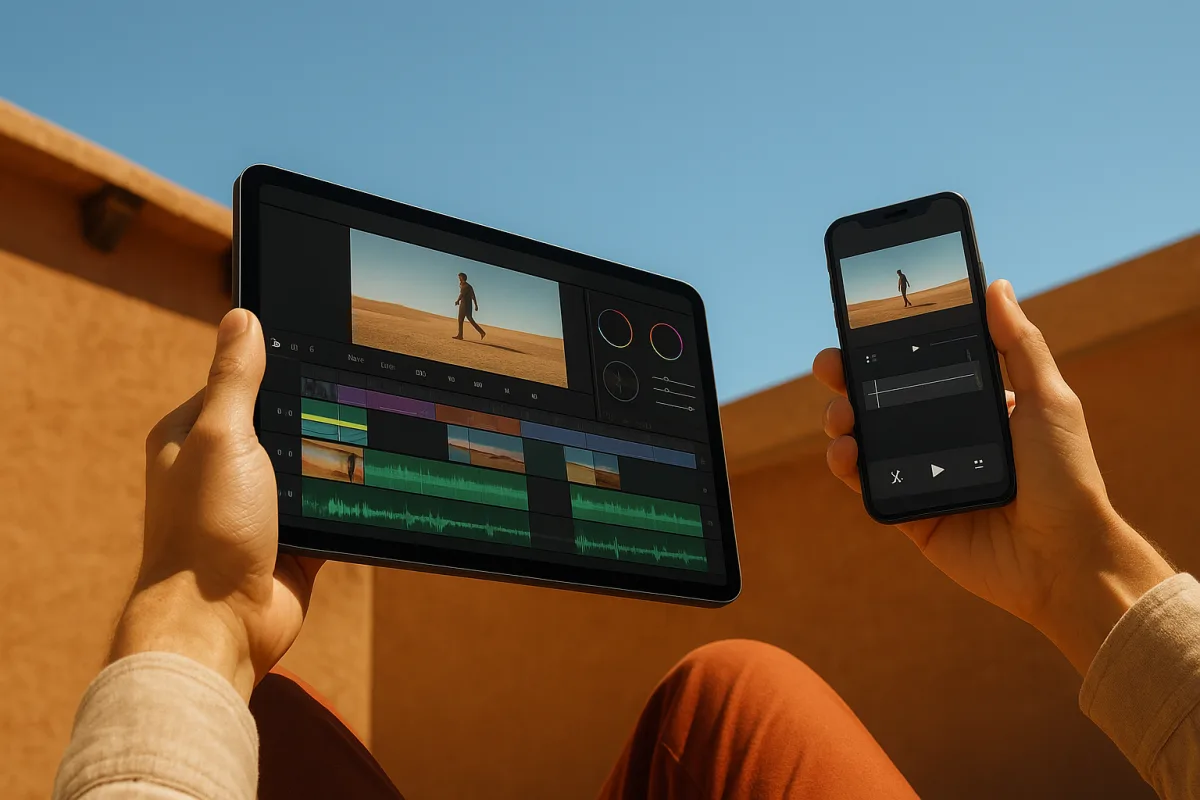
The decision: CapCut or LumaFusion for editing on the go?
For an editor working away from a desk, the choice here is between CapCut and LumaFusion. CapCut is the better recommendation for fast, social-first edits under imperfect mobile conditions. LumaFusion is the better choice for an iPad editor building a more controlled, multi-track piece.
That is not the same as saying CapCut is more professional, or that LumaFusion is unsuitable for quick work. They solve different bottlenecks. CapCut is built around getting a short edit moving quickly. LumaFusion gives you more of the timeline controls that matter once the edit becomes layered.
The meaningful dividing line is performance strategy. CapCut explicitly supports lightweight rendering and reduced preview resolution, which is useful when the footage is heavier than the device would comfortably play at full quality. LumaFusion supports demanding work, including 8K export, but the available research does not establish a formal proxy workflow.
We have not physically tested either app. This comparison rests on the reported features, not a claim that one app will play every camera file smoothly on every phone or iPad.
Head-to-head comparison
| Criteria | CapCut | LumaFusion |
|---|---|---|
| Best fit | Social creators making TikTok, Reels and Shorts quickly | iPad users making more structured, professional-style edits |
| Cost position | Entry-level | Premium |
| Timeline approach | Fast assembly, templates and AI-led tools | Multi-track timeline with six video or audio tracks reported |
| Playback strategy | Lightweight rendering, cloud-assisted AI processing and lower preview resolution | Relies more on capable hardware, with no explicit proxy workflow confirmed |
| Proxy workflow evidence | Explicit performance-oriented preview reduction, but no codec-specific proxy details supplied | No direct evidence of traditional proxies or low-resolution proxy media |
| Color and finishing | Appropriate for quick social delivery, with background removal and caption tools emphasized | Advanced color correction, keyframing and a proper audio mixer are reported |
| Best on-the-go scenario | Cutting, captioning and publishing a short social video before travel or an event ends | Refining a multi-layer edit on a capable iPad while away from the main workstation |
| Main limitation | Templates and speed can encourage decisions that look interchangeable | Heavy original media can still expose device limits without a confirmed proxy route |
CapCut has the clearer answer to the classic mobile complaint: the edit plays badly once several clips, effects and captions are stacked. It uses lightweight rendering and cloud-assisted AI processing, and lets users lower preview resolution to preserve fluid editing on devices with 4GB to 8GB of RAM.
That does not mean CapCut creates editorial proxies in the desktop sense. There is no supplied evidence about codec-specific proxy files, relinking, proxy attachment or a switchable full-resolution versus proxy media workflow. Treat its preview reduction as a practical playback control, not as a verified equivalent to Premiere Pro proxy management.
For a social cut, that distinction may not matter. If the deadline is a vertical clip from a train, backstage room or event floor, the useful fix is often a lower-resolution preview, a leaner timeline and an export that finishes. CapCut also offers auto-captions, background removal and a substantial template library aimed at TikTok, Reels and Shorts. [6]
LumaFusion approaches the job from the other end. The reported feature set includes six video or audio tracks, full keyframing, color correction and an audio mixer. [6] Those are timeline tools, not just publishing accelerators, and they matter when a piece needs sound shaping, secondary picture layers or deliberate timing.
Its fall-down point is equally clear. It supports high-resolution work and up to 8K export on powerful devices, but not a documented proxy workflow. A capable iPad can make LumaFusion feel like a serious field editor. That is different from proving it will make difficult long-GOP camera media painless.
Same footage, same deadline, different workflow
With CapCut, the sensible travel workflow is to keep the job narrow. Bring selects rather than every take, reduce preview resolution when playback falters, do the structural cut before applying effects, then run captions and graphics after timing is locked. That order saves the usual hour spent redoing automated work.
CapCut’s strength is that it acknowledges constrained devices rather than pretending every mobile timeline should run at camera-original quality. If playback is dropping frames, lower the preview load first. Do not waste time rebuilding the entire edit or assuming the footage is unusable.
LumaFusion suits a different preparation. Bring an iPad with enough headroom, organize media before leaving, and reserve its multi-track and color tools for a cut that benefits from them. If the source material is punishing, the missing confirmed proxy documentation becomes a workflow risk.
For either app, avoid turning the travel device into the only copy of the job. Mobile editing is convenient, but the timeline is still a project file tied to source media, storage and app behavior. Keep originals and exports backed up before clearing cards or reformatting anything.
Neither product can be judged here on codec-specific support. We found no detailed evidence on codecs and timeline proxy handling across these apps. That matters because “4K” tells an editor very little about whether the actual H.264, HEVC or other acquisition format will decode smoothly.
Where the rest of the field sits
CapCut and LumaFusion are the decision for this article, but the rest of the supplied field has clearer specialist roles. None displaces the finalists automatically. The right app is usually the one that removes the next workflow obstacle, not the one with the longest effects list.
VN Video Editor sits at the entry-level end and suits creators who want a more conventional multi-layer edit without a watermark. It offers multi-track editing, keyframe animation and audio waveform editing. [6] It is optimized for lower-end devices, but does not confirm proxies or reduced-resolution editing.
InShot is another entry-level option, best for beginners making quick social edits. Its reported trimming, merging, speed controls, filters and effects are paired with a straightforward interface. [22] It is optimized broadly for smooth performance, not that it provides a documented proxy system.
KineMaster is mid-range and suits Android users who need chroma keying and frame-precise editing. [13] That makes it a candidate for a more exact mobile composite or keyed talking-head correction. We found no information establishing how it handles difficult original media on a crowded timeline.
Adobe Premiere Rush is premium and suits editors who need a handoff route into Adobe’s desktop ecosystem. Creative Bloq highlights its simplicity, cross-platform support and integration with Premiere Pro. [13] It identifies AI-assisted tools, including Generative Extend, but says these are not traditional proxies and their performance benefit is not quantified.
Filmora is mid-range and suits creators who want AI-powered assistance, including text-to-video and AI auto-editing features. [22] That may shorten the first-pass assembly of a simple piece. It is not evidence that Filmora has the media-management controls an editor needs for a heavy field timeline.
Splice is mid-range and suits music-led edits where beat detection and music sync are the actual problem to solve. [22] It makes more sense for a fast montage than for an interview-led edit requiring color matching, detailed audio repair and a complex track layout.
iMovie is entry-level and suits iPhone users who want a free, pre-installed and simple editor. [13] It is the sensible choice when installing, learning and configuring another app would take longer than the edit. Its simplicity is also its limit when the timeline becomes layered.
DaVinci Resolve for iPad is premium and suits iPad users who need strong editing and color grading tools. Creative Bloq describes it as closely replicating the desktop application’s editing and grading strengths. [13] That makes it a serious alternative for color-focused work, although this brief supplies no proxy or codec-specific handling evidence.
Final Cut Pro for iPad is also premium and suits Apple users committed to an advanced mobile workflow within the Apple ecosystem. [13] It belongs on the shortlist when that ecosystem connection is the deciding factor. We found no support for claims about its proxy behavior, so do not assume desktop expectations transfer unchanged.
The practical performance test
Before selecting an app, make a one-minute test timeline using the actual delivery media. Use the intended frame rate, add the likely number of title layers, captions, music and color adjustments, then watch it through. This reveals more than a product page’s list of AI tools.
If that timeline stutters in CapCut, reduce preview resolution and continue cutting. That is the explicit performance mechanism supported. If it stutters in LumaFusion, simplify the edit or move to more capable hardware, because a confirmed proxy fallback is not documented here.
For a quick social job, CapCut wins because it reduces the number of decisions between import and publish. For a carefully built iPad edit, LumaFusion wins because a real multi-track timeline, color correction and audio mixing produce more control after the first assembly is done.
Who each option suits
CapCut
CapCut suits the editor or creator turning around vertical social work quickly, especially when the phone or tablet is not a high-spec editing machine. Its entry-level position, templates, auto-captions and background removal point toward rapid publishing rather than a long-form finishing workflow. [6]
Choose it when playback reliability and speed matter more than deep timeline control. It is particularly sensible when the footage is already destined for TikTok, Reels or Shorts, and when lowering preview resolution is an acceptable trade for keeping the cut responsive.
Its weakness is not that it lacks useful tools. It is that fast templates and automated features can become the edit’s default aesthetic. Lock the story and timing before applying them, or every revision becomes a captions, effects and layout cleanup job.
LumaFusion
LumaFusion suits an iPad editor who needs a serious mobile timeline rather than a social publishing tool with editing attached. Its premium position is justified by the reported multi-track layout, keyframing, color correction and proper audio mixer. [6]
Choose it when the job needs shaped sound, controlled color and multiple picture layers, and the device has enough performance headroom for the source material. It is the stronger fit for editors who already think in tracks, keyframes and deliberate finishing passes.
Its weakness is workflow certainty with demanding media. The research supports high-resolution capability and 8K export, but not traditional proxy editing. If your travel workflow depends on predictable proxy creation and codec-specific control, neither the supplied evidence nor LumaFusion’s reported feature set confirms that safety net.
Frequently Asked Questions
Which are the best video editing apps for mobile devices in 2026?
CapCut and LumaFusion are top choices depending on the editing needs. CapCut is recommended for fast social media edits on mixed or modest hardware, while LumaFusion suits iPad users aiming for more structured, multi-track projects with advanced controls. Adobe Premiere Rush is better if integration with Adobe Premiere Pro is needed, though it is not a full proxy workflow replacement.
How do CapCut and LumaFusion compare for mobile video editing?
CapCut focuses on quick, social-first edits using lightweight rendering and reduced preview resolution to maintain smooth playback on devices with 4GB to 8GB RAM. LumaFusion offers a multi-track timeline, color correction, keyframing, and audio mixing but relies more on powerful hardware without confirmed proxy workflows. They address different performance bottlenecks rather than being interchangeable.
What mobile video editors support proxy workflows or playback optimization?
CapCut explicitly supports performance tools like lightweight rendering and preview resolution reduction to optimize playback, though it does not create traditional codec-specific proxies. LumaFusion does not have documented proxy workflows but handles high-resolution editing on capable devices. Adobe Premiere Rush uses AI-powered features to aid smooth editing but does not rely on proxy workflows.
Which app is better for quick social media edits on mobile?
CapCut is better suited for fast social media edits, especially for TikTok, Reels, and Shorts. It offers templates, auto-captions, background removal, and cloud-assisted AI processing to keep editing fluid on less powerful devices. Its preview reduction feature helps maintain playback performance during quick edits.
How can I optimize video editing performance on a mobile device?
Reducing preview resolution and using lightweight rendering, as CapCut does, can improve playback on constrained devices. It is important to manage timeline complexity by limiting clips and effects and to avoid assuming hardware replacement is needed when playback slows. For heavier projects, using a powerful iPad with apps like LumaFusion can help, but no confirmed proxy workflows mean original media may still challenge performance.
How we researched this
This article was assembled from 23 cited references.
Nothing here is based on hands-on testing. Where a figure or finding appears, it belongs to the source cited beside it, and the writing says so rather than implying otherwise. Every source is listed below so you can check it.
Sources
- Aplicaciones para hacer videos con fotos Android e iOs
- 250+ Best Editing Apps For Videos for iPhone (2026) | Free & Paid
- 10 Best Music Video Editor Apps to Create Cinematic Wonders
- Best Video Editing Apps (2026): CapCut, LumaFusion, DaVinci
- VN Video Editor: Review & Alternative
- Top 10 Best Mobile Video Editor Apps in 2026 (Free & Paid) | eDeals
- Los mejores métodos sobre cómo acelerar un vídeo en iMovie
- WeVideo - Video Editor & Maker: Reviews, Cost & How to Cancel
- Veed AI video editor (2026) review
- Video Editing Software Pricing 2026: 20 Tools Compared
- Best Mobile Video Editing Apps in 2026 | Tested & Ranked
- The 6 Best Apps to Edit YouTube Videos from Mobile (2026) | TopApps
- The best video editing apps
- Best Mobile Video Editing Apps (No Watermark), 2026 Guide
- 15 Video Editing Mistakes Beginners Make (and How to Fix Them)
- 10 Video Editing Mistakes to Avoid in 2026 (And How to Fix Them)
- Mobile AI Video Editors: A Practical Workflow Guide | Domer AI
- AI Video Editing for Low-End PCs (2026 Guide) -
- Mobile Video Editing Apps for Action Camera Footage (2026), LumaFusion vs GoPro Quik vs Insta360 App vs CapCut · Action Camera Auditor
- Best Free Video Editing Apps for Mobile in 2026 | TecnoOrange
- Best Video Editing Apps for Smartphones: 2026 Comparison
- Top 10 Mobile Video Editing Apps in 2026, Best Editors for iPhone & Android
- 10 Best Mobile AI Video Editors in 2026: Pro Tools Compared
Related Articles
Edit Video for Promotional Content
Learn how to edit video for promotional content with tips on timelines, proxies, captions, and platform-specific formats for effective marketing videos.
Beginner Video Editing Apps Comparison: CapCut vs iMovie
Compare beginner video editing apps CapCut and iMovie to find the best fit for social videos or Mac users starting out with editing.
Edit Video for Social Media: Tips on Formats, Length & Color
Learn how to edit video for social media with tips on formats, length, proxies, and color grading for optimal engagement and platform compatibility.
Video Editing for Non-Profits: Tips, Tools, and Workflow
Learn video editing for non-profits with tips on timelines, proxies, codecs, and free tools to create effective fundraising and social videos.