
Best Video Editing Settings for Facebook in 2026
Learn the best video editing settings for Facebook including aspect ratios, codecs, proxies, and color grading to optimize your videos for 2026.
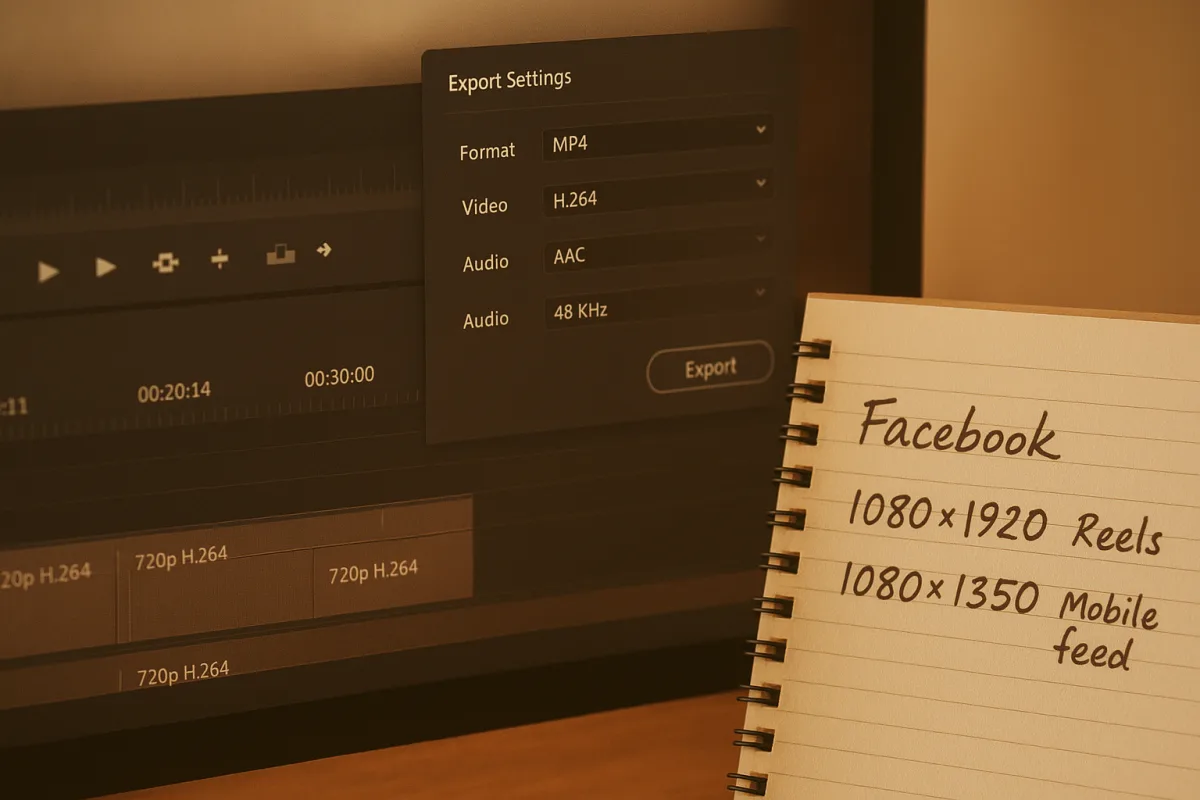
The setting that matters most is the frame shape
The most useful Facebook export setting is not bitrate. It is the sequence frame shape. Get that wrong and every later decision, from captions to shot selection, becomes a compromise made after the edit is already expensive.
Facebook is now mostly a mobile viewing environment, which changes what “full screen” means. A 16:9 horizontal video fills little of a phone held upright, while a vertical 9:16 video occupies the screen from top to bottom.
For Facebook Reels and Stories, make the working timeline 1080×1920 pixels, or 9:16. That is the native vertical delivery shape used for full-screen mobile placements. [1][2] It is also the version that most needs deliberate framing.
For a normal feed video, 1080×1350 pixels, or 4:5, is usually the practical middle ground. It occupies more vertical space than 16:9 in the feed without requiring a completely vertical composition. [3][7] This is useful for posts that may be watched both in-feed and on a desktop browser.
A horizontal feed video can still be 1920×1080, or 16:9. In-stream advertising commonly uses 1920×1080, and square 1080×1080 delivery remains an option for some ad placements. [2][5] The point is not that horizontal video has disappeared. It is that it should be a placement decision, not the default inherited from a camera.
That distinction saves time because a timeline is not simply a container for clips. It is where the editor commits to what can remain visible. A presenter framed waist-up in 16:9 may become an awkward head-and-shoulders shot in 9:16, particularly once captions and interface controls occupy the lower screen.
The costly mistake is editing a polished 16:9 master, then making vertical versions at the end. By that stage, cut points, motion graphics, interview framing, and on-screen text are all designed for width. The vertical conversion becomes a second edit, not a quick export.
Treat vertical delivery as an editorial decision
Start by asking where the viewer will encounter the video. If the job is a Reel or Story, cut on a 1080×1920 timeline from day one. If it is a feed campaign needing one broadly useful post, a 1080×1350 timeline is often easier to protect.
That choice determines the shots you need. Wide establishing shots are harder to use in 9:16 unless the subject is centrally placed or the shot has enough resolution to crop. Close-ups, demonstrations, product details, and direct-to-camera material usually translate more easily.
It also determines who needs to be involved before the edit starts. The shooter needs to know whether to leave lateral room for a crop. The graphics designer needs a vertical layout. The social producer needs to decide whether captions, logos, and calls to action will sit over footage.
A decent vertical timeline does not mean centring everything mechanically. Centre framing is safe, but it can look static. The better approach is to leave room around the important subject, then reframe each shot according to the story beat rather than applying one crop position across the whole edit.
This is where a social cut can take longer than a conventional horizontal one. The export is quick. The work is in preserving faces, products, subtitles, and meaningful action inside a narrow frame without making every shot feel like a crop from something better.
For footage shot in 4K or higher, reframing into a 1080×1920 sequence can be straightforward. For 1080p landscape originals, the crop is severe. You are using a narrow vertical slice of the original image, so resolution and composition become limiting factors quickly.
Do not solve this by stretching a horizontal image to fill the frame. Use designed side panels, a blurred background treatment, or a deliberate split-screen only where it supports the message. A bad vertical crop is usually less distracting than a fake full-screen solution.
Build proxies for speed, not for delivery
If the originals are high-bitrate H.264, H.265, or long-GOP camera media, create proxies before the serious edit. A workable proxy target for Facebook work is 1280×720, H.264 video, AAC audio, and 30 fps. [7] It is not an official Facebook requirement, it is a practical editing format.
The proxy’s job is simple: reduce decode work while preserving enough visual information to judge framing, timing, and basic colour balance. It should not be mistaken for an upload master. Facebook never sees the proxy unless someone accidentally exports from it.
The saving is mostly in timeline responsiveness. Scrubbing, multicam playback, stabilisation previews, and caption timing become easier when the editing application is decoding smaller files. On deadline, that is more valuable than chasing a marginally sharper preview image.
In Adobe Premiere Pro, use the ingest or proxy workflow to attach proxies to the original clips, then confirm the Toggle Proxies button is actually switching media. In DaVinci Resolve, generate proxies or optimized media, but verify the project is set to use them during editing.
Those are application-specific workflows, so do not assume the menu labels match across software versions. The important operational check is universal: before final export, disable proxy playback or confirm the NLE is rendering from the original camera files.
If your source is already modest 1080p H.264 at 30 fps and playback is smooth, proxies may be unnecessary. Most Facebook workflow problems are not hardware failures. They are unnecessary transcodes, mixed frame rates, poorly matched timelines, or a vertical version started too late.
The safest Facebook export is still ordinary H.264
Use an MP4 container with H.264 video and AAC audio. Facebook also accepts MOV, but MP4/H.264 is the least surprising handoff in 2026. [1][4] It works across common NLE export panels and remains widely compatible with Facebook’s processing pipeline.
AV1 is worth understanding, but not treating as a default Facebook delivery codec. It can offer better compression efficiency, and major technology companies continue to invest in it for streaming. [6] That does not mean it is the dependable social-upload choice today.
Facebook’s published and commonly reported specifications still centre on H.264 compatibility. [3][11] An efficient codec only helps if the receiving platform handles it predictably. For a client delivery or scheduled campaign, predictable processing matters more than winning a codec comparison.
Export 1080×1920 at 30 fps for Reels and Stories. Export 1080×1350 at 30 fps for a vertical feed post, or 1920×1080 at 30 fps for horizontal feed and in-stream work. [1][2] Match the export frame rate to the timeline unless there is a deliberate conversion reason.
Facebook supports video frame rates up to 60 fps, but it does not specify that creators should upload at 60 fps. [1][9] A 60 fps file is larger, takes longer to process, and may not add anything to an interview, explainer, product montage, or talking-head edit.
For audio, use AAC at 48 kHz. Sources covering Facebook specifications commonly list 128 kbps as an acceptable upload figure, while 192 to 320 kbps is a sensible final-output range when preserving music and dialogue quality matters. [3][5] Audio file size is rarely the limiting factor here.
Bitrate deserves restraint. There is no official Facebook bitrate recommendation for 1080p uploads. [1][9] A video bitrate around 5 to 8 Mbps is common practice for 1080p H.264, but it is not a Meta guarantee and should not be presented as one.
Facebook permits large uploads, including feed videos up to 10 GB, while Reels, Stories, and many ad workflows are commonly described with a 4 GB limit. [1][10] Those are ceilings, not targets. A compact, clean H.264 export is easier to upload and less likely to create avoidable processing delays.
Reels length is an editing question, not a hard technical limit
Facebook Reels do not have a hard format or length restriction as of Meta’s June 2025 update. [9] That does not mean every duration performs equally. Shorter Reels, often around 15 to 30 seconds, remain the common engagement-oriented recommendation. [9]
The useful distinction is between platform allowance and audience tolerance. Facebook may accept a long Reel, but the opening still has to earn attention. Edit the first seconds as an introduction to the value, not as a place for a logo animation or a slow setup.
A longer piece can work when the information requires it: a tutorial step, a before-and-after sequence, or a demonstration with a clear progression. The length should be determined by whether each shot advances the message, not by an assumed technical cap.
Grade for compression, not for your reference monitor
Facebook recompresses uploaded video. [12] You cannot export a file that prevents this, and viewers’ playback settings do not change the version other people receive. Selecting HD playback improves only that viewer’s playback choice, not the quality of your upload for the audience.
Work in Rec.709 with a D65 white point, gamma 2.4, and legal video levels of 16-235. [8] These are sound delivery practices for standard video, rather than Facebook-specific official colour instructions. Meta does not publish a detailed grading recipe for countering compression.
The practical reason is that social compression is least kind to difficult images: noisy shadows, very fine texture, heavy sharpening, smooth gradients, and highly saturated colour transitions. If an image barely holds together before upload, compression will make the weakness more visible.
Do not compensate by blindly lifting brightness or crushing blacks. There is no official Facebook guidance specifying a brightness offset, and no reliable published measurement showing how much Facebook changes particular colour or luminance values. [8] Judge the grade on a calibrated reference, then inspect a real platform upload.
Keep skin tones plausible, protect highlight detail, and avoid pushing shadow noise into visibility. Those choices help across phones and browsers because Facebook’s format support is broadly consistent across regions and devices, while the screens themselves are not. [1][7]
The final practical check is boring and essential: upload an unlisted or low-stakes test, then watch it on a phone. Check caption legibility, crop safety, black levels, motion, and the first frame. That five-minute check often saves the hour otherwise spent explaining why a technically correct export looks wrong in the feed.
Frequently Asked Questions
What are the best video editing settings for Facebook Reels?
For Facebook Reels, edit on a 1080×1920 pixel timeline with a 9:16 aspect ratio to match the vertical full-screen mobile format. Export as an MP4 using the H.264 codec for video and AAC audio at 48 kHz. Deliver at 30 fps unless the source or creative intent requires 60 fps.
Which aspect ratio should I use for Facebook Stories videos?
Facebook Stories videos should use a 9:16 aspect ratio with a resolution of 1080×1920 pixels. This vertical format fills the mobile screen fully and is the native shape for Stories placement.
What codec and format are recommended for Facebook video uploads?
The safest and most compatible upload format in 2026 is MP4 with H.264 video codec and AAC audio codec. This combination remains standard despite newer codecs existing, as Facebook’s support for alternatives like AV1 is limited.
How do proxies help in editing videos for Facebook?
Using 720p H.264 proxies can speed up editing by reducing the timeline’s processing load when working with large original files. Proxies do not affect final upload quality because the original camera media is reconnected before export.
What frame rate is optimal for Facebook video exports?
Deliver videos at 30 frames per second as a standard practice. Facebook supports up to 60 fps, but there is no official recommendation favoring higher rates unless the source footage or creative purpose specifically calls for it.
How we researched this
This article was assembled from 12 cited references.
Nothing here is based on hands-on testing. Where a figure or finding appears, it belongs to the source cited beside it, and the writing says so rather than implying otherwise. Every source is listed below so you can check it.
Sources
- Facebook Video Format, Size & Upload Limits (2026 Specs)
- Facebook Video Ad Sizes in 2026: Every Placement, Length, Codec, and Aspect Ratio | AdMakeAI Blog
- Facebook Video Specs (2026): Size, Length, Format & Limits
- Facebook Video Format, Size, and Specs: Complete 2026 Guide | VideoConvert
- Facebook Video Specs in 2026: Sizes, Formats & Limits
- Google, Meta, and others think they've found the key to smoother mobile video streaming - but all isn't quite what it seems
- Facebook Video Format Guide: Specs & Requirements (2026) | Synchro
- Color Grading for Social Media: How Your Videos Should Look on Mobile | Clouds Agency
- Facebook Reels Video Specs 2026: Size, FPS, Bitrate and Safe Zones - Media Spec Lab
- Facebook Video Size Limits (2026): File Size, Length & Specs — VideoToolery
- Video Format for Facebook: The Complete 2026 Guide
- Why is my video download blurry on Facebook? – PosterMyWall Help Center
Related Articles
Edit Video for Social Media: Tips on Formats, Length & Color
Learn how to edit video for social media with tips on formats, length, proxies, and color grading for optimal engagement and platform compatibility.
Edit Video for Educational Content
Learn how to edit video for educational content with tips on timelines, proxies, codecs, and color correction for engaging teaching videos.
Video Editing Workflow: How to Create an Efficient Process
Learn how to create a video editing workflow covering timelines, proxies, codecs, and color grading for smooth post-production.
How to Use Green Screen in Video Editing: Setup and Tips
Learn how to use green screen in video editing with tips on setup, lighting, materials, and software for clean chroma key results.