
How to Choose the Right Video Editing Keyboard
Learn how to choose the right video editing keyboard for efficient shortcuts, comfort, and workflow with Corsair K95 and Logitech Craft comparisons.
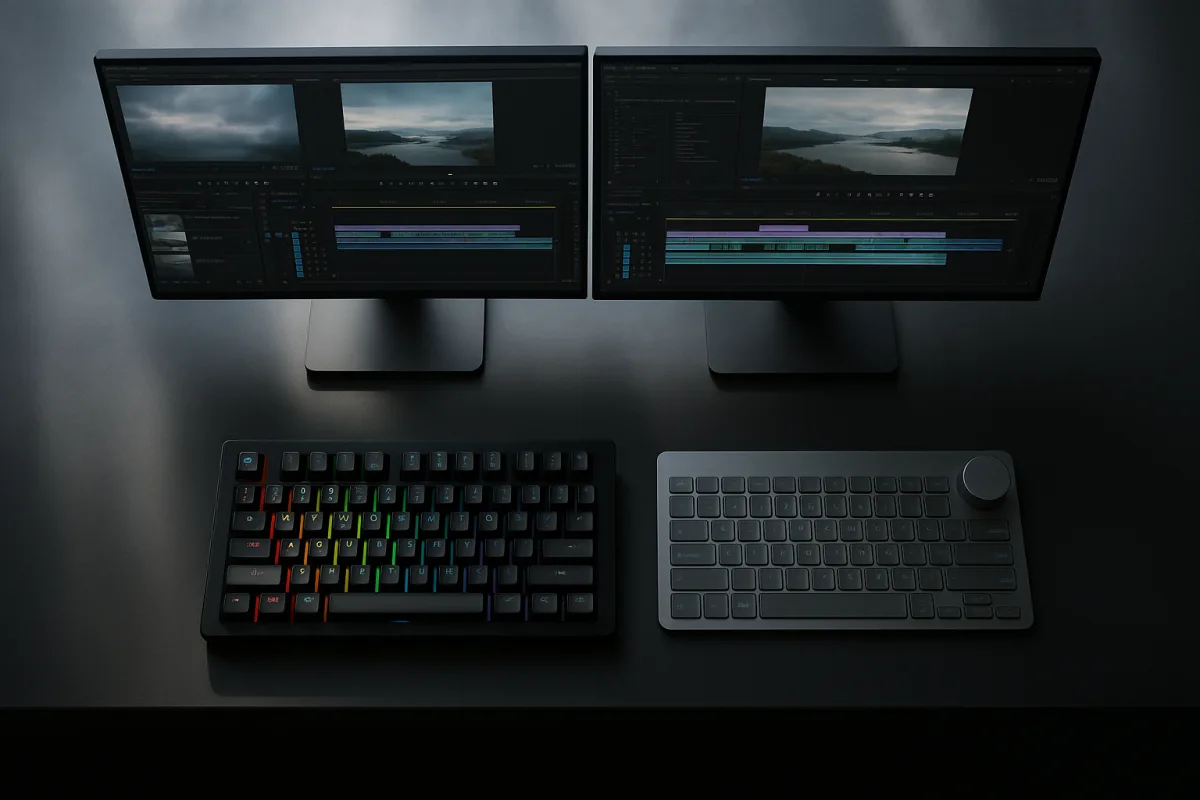
The commands under your left hand are the ones to fix first
Ripple delete, add edit, marker, undo, play, and shuttle controls can turn into a hand dance across modifier keys during a long timeline cleanup. A better keyboard does not make Premiere Pro, DaVinci Resolve, or Final Cut Pro process media faster. It reduces the number of awkward reaches between edit commands.
We would pick the Corsair K95 RGB Platinum XT for most editors who want one keyboard to handle a demanding shortcut workflow. Its six programmable macro keys and mechanical switches give it a clearer editing-efficiency case than the Logitech Craft’s single Creative Input Dial.
The Logitech Craft is still a close second, especially if you want a premium wireless keyboard and can assign recurring adjustments to its dial. TechRadar reported that the Craft’s Creative Input Dial is intended for quick adjustments, which can be faster than hunting through menus or repeated key combinations. [24]
Neither option replaces a purpose-built DaVinci Resolve keyboard, an editing console, or an NLE-specific shortcut layout. They are general-purpose premium keyboards that can improve the work around the timeline, provided you program them around commands you actually repeat.
Logitech Craft vs. Corsair K95 RGB Platinum XT
| Criterion | Logitech Craft Advanced Wireless Keyboard | Corsair K95 RGB Platinum XT Mechanical Gaming Keyboard |
|---|---|---|
| Editing control | Creative Input Dial for quick adjustments | Six dedicated programmable macro keys |
| Shortcut workflow | Customizable controls centered on the dial | Macro keys give repeated commands dedicated physical locations |
| Key feel | Switch type is not specified in the reported features | Mechanical keyboard |
| Backlighting | Backlighting is not a reported reason to choose it | Dynamic per-key RGB backlighting |
| Connection approach | Wireless | Wireless behavior is not stated in the reported features |
| Ergonomic approach | No split layout or dedicated ergonomic feature is reported | No split layout or dedicated ergonomic feature is reported |
| Desk role | Premium general editing keyboard with a dial | Premium macro-heavy keyboard for shortcut-driven work |
| Best fit | Editors who want customizable controls and less cable clutter | Editors who want mechanical feedback and direct macro access |
| Main limitation | One dial may not replace several dedicated macro keys | Advanced lighting and macro hardware may be excessive if you mainly need a clean wireless typing keyboard |
1. Dedicated editing controls
The Craft’s defining feature is its Creative Input Dial. If you regularly make the same type of adjustment, a physical dial can keep your cursor in the program monitor, Effect Controls panel, or color interface instead of moving through menus. [24]
That is a strong fit for an editor who values a clean desktop and wants one flexible control within reach. The dial is also less intimidating than a bank of macro keys when you are building a shortcut system from scratch.
The K95 takes the opposite route. Its six programmable macro keys put six commands on separate physical keys, so a repeated action does not need a layered shortcut or a menu trip. That suits editors who already know which commands slow them down.
We would start with the K95’s macro keys for a busy editorial timeline. Assign the six keys to actions that cost you the most hand travel, such as add edit, ripple delete, lift, extract, marker, toggle snapping, or a frequently used panel command.
Do not fill the keys with commands you use once an hour. A macro row pays off when it handles operations that recur through every string-out, selects pass, and revision round.
2. Shortcut workflow
Both keyboards can improve shortcut access, but they do so differently. The Craft concentrates its advantage in a dial, while the K95 spreads its advantage across six programmable keys.
That makes the K95 easier to map around a specific NLE layout. You can dedicate a macro key to a command that is otherwise difficult to reach, then leave your normal J, K, L, I, O, and trim shortcuts where your fingers expect them.
The Craft works best when one adjustable control can carry real weight in your day. If the dial becomes a novelty you touch only during setup, it will not save time, regardless of its premium position in the field.
Our first fix would be simple: write down the six commands you repeat most in one hour of editing. If that list is clear, the K95 has the better path. If one repeated adjustment dominates, the Craft deserves the closer look.
3. Key feel and long-session fatigue
The Corsair is a mechanical keyboard. Mechanical switches provide tactile feedback, typically last longer than membrane designs, and can suit editors who spend long sessions entering shortcuts and text metadata. They can also be louder. [9] [10] [31]
Mechanical keyboards commonly offer different switch behaviors, including linear, tactile, and clicky responses. The reporting here does not identify the K95’s specific switch choice, so do not assume a particular sound or resistance level from its mechanical label alone.
The Craft’s reported features center on wireless operation and the Creative Input Dial, not on its switch design. If tactile key response is part of why you type accurately under deadline, that leaves the K95 with the better-supported case.
Membrane keyboards are quieter and softer, which can be better in a shared room or a quiet edit bay. Their tradeoff is less tactile feedback, lower reported durability, and fewer customization options than mechanical models. [9] [10] [31]
4. Lighting and visibility
The K95 includes dynamic per-key RGB backlighting. For editing, the feature earns its space only if you use it to find controls in a dim room or distinguish shortcut groups at a glance.
Do not confuse RGB with an editing shortcut system. Lighting can help you locate keys, but it will not organize your Premiere Pro, Resolve, or Final Cut Pro command map for you.
The Craft’s key reason to buy is the dial, not lighting. If low-light visibility is the requirement, an editing-specific option such as the Logickeyboard Astra 2 belongs elsewhere in the field because it uses backlit shortcut keys for Adobe Premiere Pro. [13]
5. Wireless operation and desk setup
The Logitech Craft is wireless, which suits an editor who needs less cable clutter or moves between devices and workspaces. A wireless keyboard still needs charging and reliable connection management, so it is best when that flexibility solves a real desk problem.
Wireless technology varies. High-quality 2.4 GHz models can approach wired latency, while Bluetooth tends to have higher and more variable latency. Wired keyboards avoid battery dependency and connection interruptions. [21] [22]
The reported details here do not establish the K95’s connection method, latency, or battery behavior, so we would not use those claims to choose between these two. Choose the Craft for its stated wireless design, not an assumed speed advantage.
A narrower keyboard can let you place a mouse or pen tablet closer to your centerline, reducing shoulder reach. Full-size layouts preserve a numeric keypad and navigation cluster, but take more desk width. [6] [7] [8]
6. Ergonomics and layout
Neither the Craft nor the K95 is presented here as a dedicated ergonomic keyboard. If wrist, shoulder, or finger strain is the problem you are trying to solve, their extra controls may not address the root cause.
The premium Kinesis Advantage2 is the specialist alternative for that situation. Ergonomic Trends highlights its split layout and programmable keys, making it the better fit for editors who need an ergonomic design to reduce strain through long sessions. [25]
At a lower field position, the mid-range Microsoft Sculpt Ergonomic Keyboard also focuses on comfort, with a split layout and cushioned palm rest reported by PCMag. [27] It is for an editor who needs ergonomic features without moving into the premium category.
We would skip both the Craft and K95 if discomfort is already forcing breaks or changing how you hold the mouse. Fix the physical setup first, then add shortcut hardware around it.
The rest of the field
The premium Logitech G915 TKL LIGHTSPEED is for editors who want low-profile mechanical switches, wireless connectivity, and customizable RGB lighting in a tenkeyless form. Its missing numeric keypad can free desk space while keeping the familiar navigation keys.
The mid-range Logitech K780 is for editors moving among devices and platforms. CNET reports simultaneous connections to three devices and a built-in stand, so it fits a desk where a computer, tablet, and phone all take part in review or notes work. [26]
The mid-range Logitech K400 Plus is for compact media control, with an integrated touchpad and media controls. It is better for a couch, playback machine, or secondary screen than for a shortcut-intensive primary editing station.
The entry-level Redragon K502 RGB is the budget option for editors who want RGB backlighting and multimedia controls. TechBargains positions it around basic features, which makes it a starting keyboard rather than a premium shortcut-control solution. [28]
The entry-level Logitech K120 is for an editor who needs a straightforward, reliable keyboard with low-profile keys and no extra control layer. It is the choice when dependable typing matters more than macros, lighting, wireless operation, or customization.
The mid-range Razer Cynosa V2 is for editors who prefer a membrane keyboard with customizable Chroma RGB lighting and dedicated media controls. IGN identifies those features, making it the quieter-feeling alternative to a mechanical-heavy setup. [29]
The mid-range Keychron K3 Ultra-Slim Wireless Mechanical Keyboard is for an editor who wants a compact wireless mechanical board. Its hot-swappable switches and RGB backlighting suit someone who values a smaller footprint and the option to change switch behavior.
Who each option suits
The Logitech Craft suits the professional editor who wants a premium wireless keyboard and can make the Creative Input Dial part of daily work. It falls down when you need several dedicated commands immediately available, or when tactile mechanical feedback is central to your typing preference.
The Corsair K95 RGB Platinum XT suits the editor whose day is built around repeatable timeline actions, custom macros, and mechanical keys. We would choose it for heavy shortcut users because six programmable macro keys can map directly to six recurring editing tasks.
The K95 falls down for editors who want a restrained, cable-light desktop or who do not have six commands worth dedicating to macro keys. Its RGB system is also a poor reason to buy it unless key visibility or visual grouping genuinely helps your workspace.
These two are close because both sit in the premium field and both can remove friction from repeated editing work. Pick the Craft when the dial changes your routine. Pick the K95 when macros are the fix that saves time every day.
Frequently Asked Questions
How do I choose the right video editing keyboard?
Choose a keyboard based on how you use shortcuts and controls rather than codecs or color workflows. Identify the commands you repeat most often and pick a keyboard that offers easy access to those, such as dedicated macro keys or a control dial. Comfort, layout, and shortcut efficiency should guide your choice.
What are the benefits of mechanical vs wireless keyboards for video editing?
Mechanical keyboards provide tactile feedback, greater durability, and customization options, which can improve accuracy and comfort during long editing sessions. Wireless keyboards reduce cable clutter and offer a cleaner desk setup, but may have fewer dedicated shortcut keys and less tactile feedback depending on the model.
Which keyboard is better for video editing: Corsair K95 or Logitech Craft?
The Corsair K95 RGB Platinum XT is better for editors who want multiple dedicated programmable macro keys and mechanical switches for tactile feedback. The Logitech Craft suits those who prefer a wireless setup and benefit from a single Creative Input Dial for quick adjustments. Both are premium options but serve different shortcut workflows.
How do programmable macro keys improve video editing workflow?
Programmable macro keys allow assigning frequently repeated commands to dedicated physical keys, reducing awkward hand movements and shortcut layering. This can speed up tasks like ripple delete, add edit, or toggling snapping by keeping these commands within easy reach during intensive editing.
Does keyboard lighting help with video editing shortcuts?
Backlighting can improve shortcut visibility in low-light environments, making it easier to locate keys quickly. However, lighting alone does not determine editing efficiency; shortcut access and layout have a greater impact on workflow.
How we researched this
This article was assembled from 31 cited references.
Nothing here is based on hands-on testing. Where a figure or finding appears, it belongs to the source cited beside it, and the writing says so rather than implying otherwise. Every source is listed below so you can check it.
Sources
- The best keyboard for video editing in 2026
- Razer Reclusa Mini 65% review: My favorite Razer keyboard of 2026 isn't a Huntsman
- Keychron just ended the magnetic vs. mechanical keyboard debate: the V6 Ultra Hybrid proves you can have both with literally no compromises and even a magnetic tactile switch
- Corsair's Galleon 100 SD is an LED-lit keyboard with a built-in Stream Deck - $349 offering includes 720 x 180 screen, dials, and more
- Best Photo Editing Keyboards & Consoles: Top Picks Compared - PhotoWorkout
- Understanding the Best Left-Handed Keyboard Across Various Workflows | Lenovo US
- Compact vs. Full-Size Keyboard Guide | Burotic
- Small Desk Setup Guide: Compact Keyboards for Creators | Trendshelf
- Mechanical vs Membrane Keyboards: Which Should You Choose? - RTINGS.com
- Mechanical vs. Membrane Keyboards | Logitech
- Logickeyboard LKB-CBASE-A2M-DE | Logickeyboard LKB-CBASE-A2M-DE keyboard USB QWERTZ German Black | OCTO24.com
- Best Video Editing Keyboards
- Logickeyboard ASTRA 2 Backlit Keyboard LKB-LOGXP2-A2M-US B&H
- NEW Pro Tools Keyboard | Backlit | Wired & Wireless | Mac & PC
- Editors Keys launches first wireless backlit editing keyboard | Today in Business
- TOUR BOX Lite - Wired Editing Keyboard Instruction Manual
- TourBox Lite review: An entry-level console for editors who are tired of keyboard shortcuts
- Blackmagic Design DaVinci Resolve Editor Keyboard | Sweetwater
- Editors Keys Launches AB10 Wireless Backlit Editing Keyboard Range
- Logitech MX Creative Console, 9 Customizable LCD Keys, Stream Deck Accessories, Control Dial for Graphic Design, Adobe, Zoom, Spotify - Graphite, 3-Month Adobe Creative Cloud Membership
- Wireless Mechanical Keyboards for Gaming: Latency and Battery, Gamer Manual
- Wired vs Wireless Keyboards: Where Milliseconds Still Matter
- Epomaker HE75 V2 TMR review
- Logitech Craft Advanced Wireless Keyboard
- Kinesis Advantage2 Ergonomic Keyboard
- Logitech K780 Multi-Device Wireless Keyboard
- Microsoft Sculpt Ergonomic Keyboard
- Redragon K502 RGB Gaming Keyboard
- Razer Cynosa V2 Gaming Keyboard
- TOUR BOX Elite Plus - iPad Drawing Bluetooth Singapore | Ubuy
- Mechanical vs. Membrane Keyboard: What’s the Difference? | HP® Official Site
Related Articles
CapCut vs Adobe Premiere Mobile
Compare CapCut and Adobe Premiere Mobile for Android video editing. Learn which app suits social edits or professional multi-track projects best.
Video Editing Review Workflow: Best Practices for Feedback
Learn how to create an efficient video editing review workflow to manage feedback, revisions, and approvals in post-production.
Video Editing Delivery Specifications: Avoid Setup Mistakes
Learn how video editing delivery specifications prevent common setup errors and improve proxies, frame rates, color, and export workflows.
Edit Video for Promotional Content
Learn how to edit video for promotional content with tips on timelines, proxies, captions, and platform-specific formats for effective marketing videos.