
Mastering Spinning Logos in Da Vinci Resolve: Fusion Tutorial

- Authors
- Published on
- Published on
In this thrilling episode of Da Vinci Resolve mastery, the wizards at Daniel Batal's workshop unveil the secrets of crafting a mesmerizing spinning logo. The journey kicks off in the Fusion page, where a new composition named "spinning logo" is conjured into existence. With a flick of the wrist, a background node is summoned to provide the canvas for this visual symphony, ensuring the perfect setting and transparency. The stage is set, and the team delves into the realm of 3D magic by introducing an image plane to lay the foundation for their logo to dance in a three-dimensional space.
As the logo takes its first steps into this newfound dimension, a merge 3D node and a render 3D node are enlisted to bridge the realms of 3D and 2D, seamlessly integrating the logo into the visual tapestry. But the pièce de résistance arrives in the form of the transformative 3D node, unlocking a realm of possibilities for dynamic movements and rotations along various axes. With deft precision, keyframes are strategically placed to set the logo spinning, infusing life and movement into the static design.
But the thrill doesn't stop there; a clever looping technique is unveiled, ensuring that the logo continues its mesmerizing dance indefinitely. The speed of the spin becomes a mere flick of the wrist as the team adjusts the keyframes, dialing up the tempo of this visual ballet. Transitioning back to the edit page, the spinning logo takes its place atop a bustling cityscape, a testament to the seamless integration of 3D artistry into the world of video editing. The final touch of zooming in adds a dynamic flair, showcasing the endless creative possibilities within Da Vinci Resolve's realm.
Image copyright Youtube
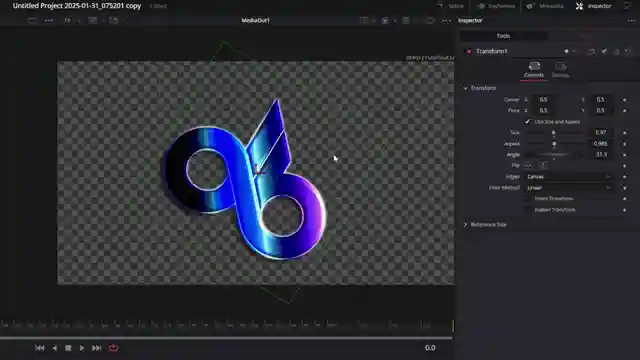
Image copyright Youtube
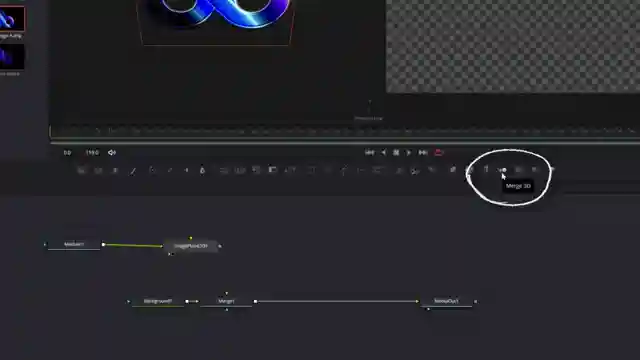
Image copyright Youtube
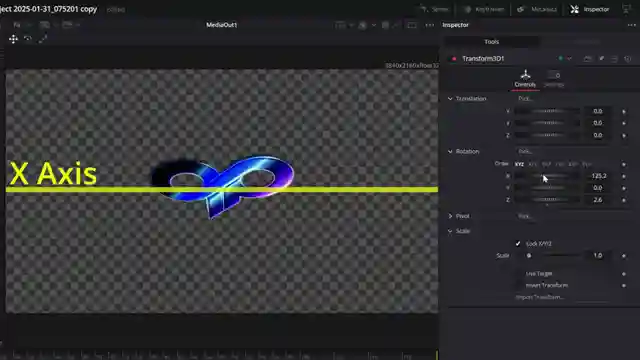
Image copyright Youtube
Watch Create a Spinning Logo Effect - DaVinci Resolve on Youtube
Viewer Reactions for Create a Spinning Logo Effect - DaVinci Resolve
Positive feedback on the tutorial and teaching style of the creator
Requests for specific tutorials on chroma key effects, best laptops for Resolve, and logo animation
Technical issues with rendering in Resolve and seeking solutions
Request for help on activating a feature in Resolve and managing project assets
Request for tutorials on specific editing styles like symbiote style edit
Suggestions for using Blender
Language-specific request for fixing audio waveform issue in Resolve
Request for downloading Resolve without email
Related Articles

Cinematic Color Grading: Free LUT Tips for Sony FX 3 in Da Vinci Resolve
Learn the secrets of cinematic color grading with Full Time Filmmaker's free LUT in Da Vinci Resolve. Transform Sony FX 3 footage into stunning visuals with expert tips and techniques. Elevate your editing game and create professional-grade videos with this comprehensive tutorial.
Master Cinematic Animations: Joseph's Ultimate Editors Guide
Join Joseph | Video Editing on a thrilling journey through creating cinematic animations in this masterclass. Learn to craft high-quality backgrounds, mesmerizing spiral animations, and post-production enhancements. Download project files and explore over 300 video editing master classes in Ultimate Editors.

Navigating the Realities of Full-Time Content Creation
YCImaging explores the harsh realities of full-time content creation, emphasizing the importance of embracing one's unique journey and avoiding the pitfalls of comparison on social media.

Free 60+ Transitions Pack: Premiere Installation Guide & Creative Tips
Kyler Holland offers a free preset pack with 60+ transitions for video editing. Download for free or support the channel. Install in Premiere, choose from Linear, ease out, and ease in transitions. Easily apply effects to clips and get creative with seamless transitions.